Introduction – When AI Becomes Part of Everything
Artificial Intelligence is no longer something we access through a special chat window or standalone website like ChatGPT or Claude. It has quietly become part of the tools we already use every day.
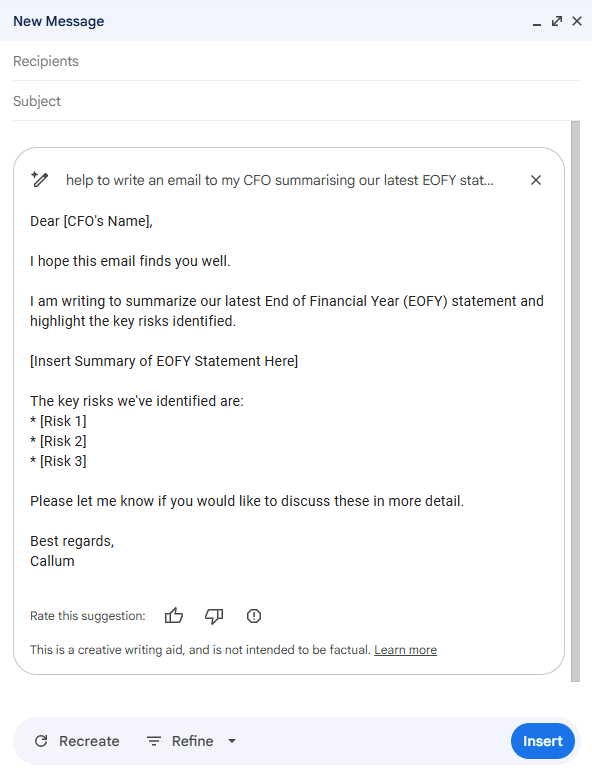
If you open Google Search, you now see an AI-generated summary at the top of your results. In Gmail, AI suggests short replies or drafts your emails. In Microsoft Word and Google Docs, it helps rewrite and improve writing. In Excel or Google Sheets, it analyses data and creates formulas for you. Even in PowerPoint or Canva, AI can generate presentation outlines and visual designs automatically.
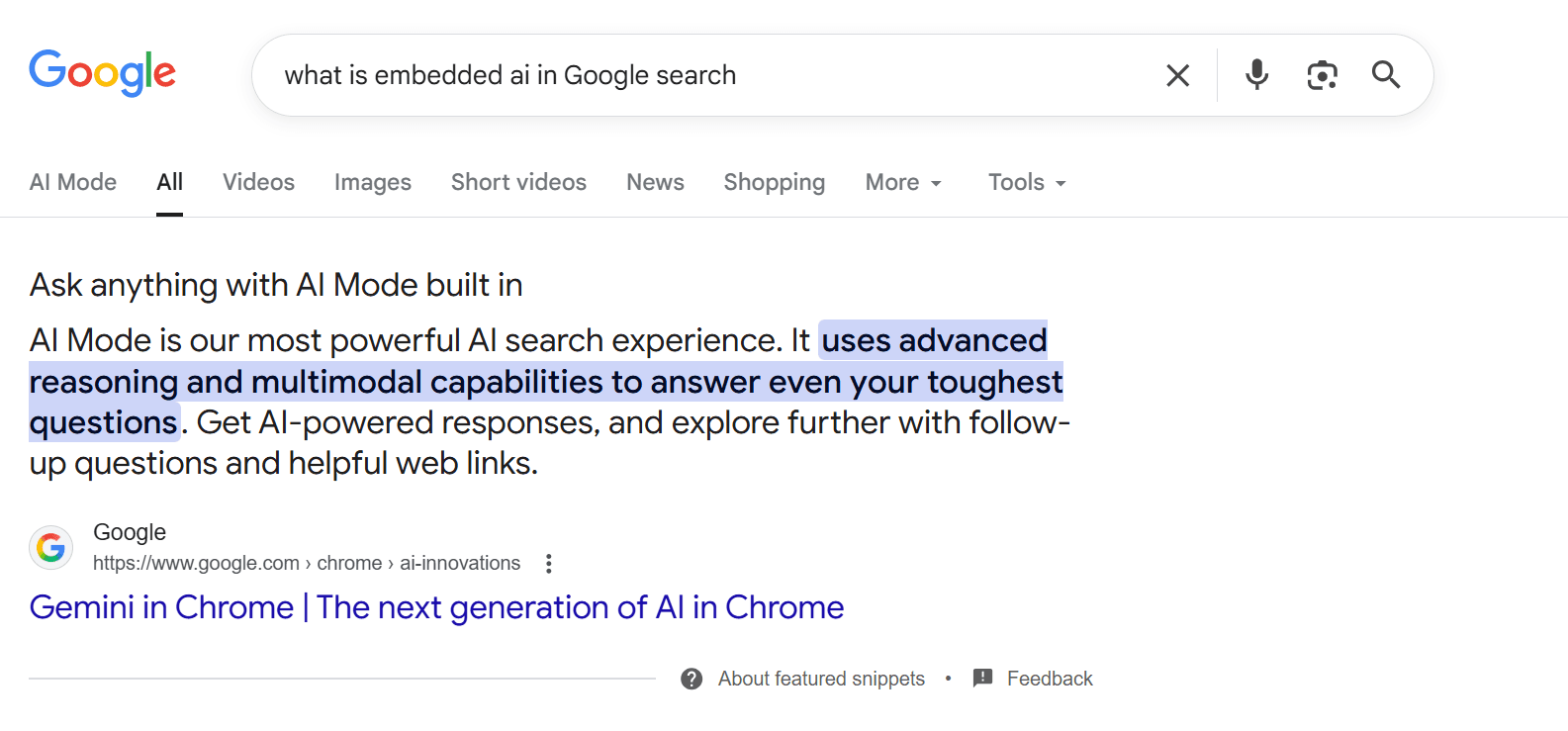
This trend — the embedding of AI and Large Language Models (LLMs) directly into everyday software — is reshaping how people work. It’s no longer about “using AI” as a separate task, but about AI enhancing the tools we already know.
This chapter explains what it means to have AI embedded inside modern business applications, why this approach is powerful, and how it is transforming accounting and enterprise systems such as SAP, Oracle, and other modern SaaS accounting tools.
From Standalone Tools to Embedded Intelligence
When ChatGPT launched, it was a standalone website where users typed questions and received answers. While incredibly powerful, this setup required switching contexts — you had to leave your regular workflow, copy information into ChatGPT, and then bring the result back to your main tool.
Embedded AI eliminates that friction. Instead of leaving your software, the AI comes to you — inside the application you’re already using.
For example:
In Microsoft Excel, you can now type natural language commands like “Show me trends in quarterly expenses”, and Excel’s built-in Copilot automatically analyses your data and builds a chart.
In Google Sheets, AI can write complex formulas or summarise data without the user having to remember syntax.
In Gmail, AI drafts emails based on a short instruction like “Reply politely and confirm the meeting.”
In Outlook, it summarises long email threads automatically.
This shift from “AI as a destination” to “AI as a companion” makes artificial intelligence invisible yet ever-present — woven into the very fabric of digital work.
How Embedded AI Works in Business Applications
When an LLM is integrated into a business application, it acts as a co-pilot or assistant that understands both natural language and the context of the system it operates within.
For instance, inside an accounting application, the AI doesn’t just understand plain English — it also understands the structure of your financial data, the fields in your reports, and even compliance rules.
When you ask something like “Summarise the cash flow for this quarter and highlight any anomalies,” the embedded AI doesn’t need you to export data to ChatGPT. It already has secure access to your financial tables, transactions, and ledgers.
This kind of integration allows it to:
Generate instant insights without manual data transfers.
Reduce repetitive tasks like reconciliations or data cleaning.
Produce summaries, forecasts, and visual dashboards instantly.
In essence, the AI becomes an intelligent layer sitting on top of your existing business processes — understanding both your data and your intent.
Everyday Examples – AI in Productivity Tools
To understand the scope of this transformation, consider some examples of how embedded AI now appears across familiar tools:
Email and Communication:
Gmail and Outlook both offer automatic drafting, smart replies, and summarisation.
Slack and Teams now summarise conversations and generate meeting notes automatically.
Documents and Presentations:
Word and Google Docs use AI to rewrite, expand, or simplify text.
PowerPoint and Canva can now design slides, suggest layouts, and even generate images.
Spreadsheets and Data:
Excel and Google Sheets include natural language commands (“Explain this data” or “Forecast next quarter’s sales”).
Tableau and Power BI use AI to generate visualisations and explanations automatically.
Search and Browsing:
Google Search and Microsoft Bing use generative summaries to condense search results into short, clear answers.
This pattern is clear: every tool that deals with text, numbers, or visuals is being enhanced by AI — and the accounting profession is right in the middle of this transformation.
Embedded AI in Accounting and ERP Systems
Accounting systems have long been among the most data-rich business platforms. They store financial transactions, payroll data, expense records, and compliance information — perfect material for AI to analyse and interpret.
As a result, LLMs are now being embedded directly into leading accounting and ERP systems, such as SAP, Oracle Financials, Workday, NetSuite, and Xero.
Let’s explore a few examples and case studies that illustrate how this works in practice.
Example 1 – SAP Joule: AI for Enterprise Decision-Making
SAP, one of the world’s largest enterprise software companies, has embedded a generative AI assistant called Joule across its ERP and finance products.
Joule acts as a conversational interface for business data. For instance, a financial controller can type or speak a request such as:
“Show me the top five cost centres that increased spending last quarter, and summarise possible reasons.”
Joule analyses SAP’s structured data — expenses, procurement, HR, and supply chain — and provides an answer instantly. It can even generate a chart or a written explanation that can be used directly in management reports.
In accounting and finance contexts, Joule supports:
Automated variance analysis.
Drafting of financial narratives.
Identification of unusual spending or missing approvals.
Generating quick summaries of key performance indicators.
This embedded AI saves hours of manual work that would traditionally involve exporting data, pivoting tables, and writing analysis reports.
In short, SAP Joule turns ERP data into conversation, bridging the gap between complex systems and human understanding.
Example 2 – Microsoft Dynamics 365 Copilot
Microsoft has also embedded generative AI into its suite of business applications, including Dynamics 365 Finance, Business Central, and Power Platform.
Dynamics Copilot can:
Draft customer communications for billing and collections.
Analyse transactions to detect anomalies or duplicate invoices.
Generate narratives explaining financial performance for reports.
Because it is directly embedded within the system, users no longer need to move data into Excel or ChatGPT. The AI already understands the context of the transactions and can explain them instantly in plain language.
For accountants, this means more time analysing results and less time preparing them.
Example 3 – AI in Modern Accounting SaaS Tools
Smaller, cloud-based accounting systems have also rapidly adopted embedded AI.
Xero uses AI to automatically categorise transactions, suggest account codes, and detect anomalies.
QuickBooks now offers an AI assistant that can answer questions such as “What are my unpaid invoices?” or “How did expenses compare to last month?”
FreshBooks includes generative summaries of invoices and project budgets.
These features are not separate applications — they are part of the product. The user simply works as usual, and the AI quietly provides assistance in the background.
This embedded approach means accounting professionals no longer need to be AI experts. They just benefit from smarter automation built directly into the systems they already use.
How Embedded AI Differs from Standalone AI Tools
It’s helpful to distinguish between standalone AI tools (like ChatGPT, Claude, or Gemini) and embedded AI systems (like SAP Joule or Excel Copilot).
Standalone AI Tools:
Require you to copy or describe your data manually.
Work independently of your existing systems.
Are excellent for brainstorming, writing, or learning new concepts.
Offer flexibility but raise privacy or compliance concerns when handling confidential data.
Embedded AI Systems:
Operate inside your business software.
Have secure access to structured financial data.
Offer real-time insights, summaries, and automation directly within workflows.
Are usually more secure and compliant because they stay within enterprise environments.
In other words, standalone tools are great for creativity and research; embedded tools are ideal for operational efficiency and business accuracy.
Benefits of Embedded AI for Accounting Professionals
For accountants, finance officers, and auditors, embedded AI brings several clear benefits:
1. Context-Aware Assistance
The AI already knows the structure of your chart of accounts, cost centres, and reports. You don’t need to explain context — it’s built in.
2. Seamless Workflow
You stay inside your accounting or ERP application. No need to switch to a different window or upload sensitive files.
3. Real-Time Insights
Because the AI works on live data, it can provide up-to-date insights at any moment.
4. Enhanced Compliance
Enterprise providers ensure embedded AI operates under strict data protection and audit policies.
5. Efficiency and Accuracy
Routine tasks like report drafting, reconciliation, and data summarisation become faster and less error-prone.
Looking Ahead – The Future of Embedded AI
The future of AI in business isn’t about separate apps — it’s about integration.
Soon, every button, search bar, and data entry field may have an intelligent layer beneath it, ready to assist. Accountants will ask their systems questions in natural language, and the system will instantly produce results — compliant, accurate, and formatted for reporting.
Enterprise vendors like SAP, Oracle, and Microsoft are already racing to embed generative AI throughout their ecosystems. In parallel, small SaaS tools for accounting, payroll, and analytics are following the same path.
Just as spreadsheets transformed accounting in the 1980s, embedded AI will define the next era of financial productivity.
Conclusion – AI Everywhere, Quietly Working Beside You
We’ve entered a time when AI is no longer something separate — it’s part of everything we use. From Gmail to SAP, from Excel to Xero, LLMs now live inside the applications where professionals already work.
For accountants and business analysts, this means the ability to interpret, explain, and communicate financial insights faster than ever before — not by learning new tools, but by working with smarter ones.
AI has moved from being an add-on to being a built-in — the invisible colleague who helps you every step of the way.