Introduction – From Answering to Doing
For years, Artificial Intelligence systems like ChatGPT or Gemini mainly worked in a conversational mode — you asked questions, and they answered. This was helpful for learning, drafting text, or analysing information, but the AI couldn’t do anything beyond generating text.
That has now changed.
We are entering an era where AI doesn’t just respond — it can take actions on your behalf inside software systems. This is known as Agent Mode.
Agent Mode turns a passive AI assistant into an active digital agent that can read, reason, and perform tasks — such as updating spreadsheets, sending emails, scheduling meetings, or generating reports — all while following your instructions.
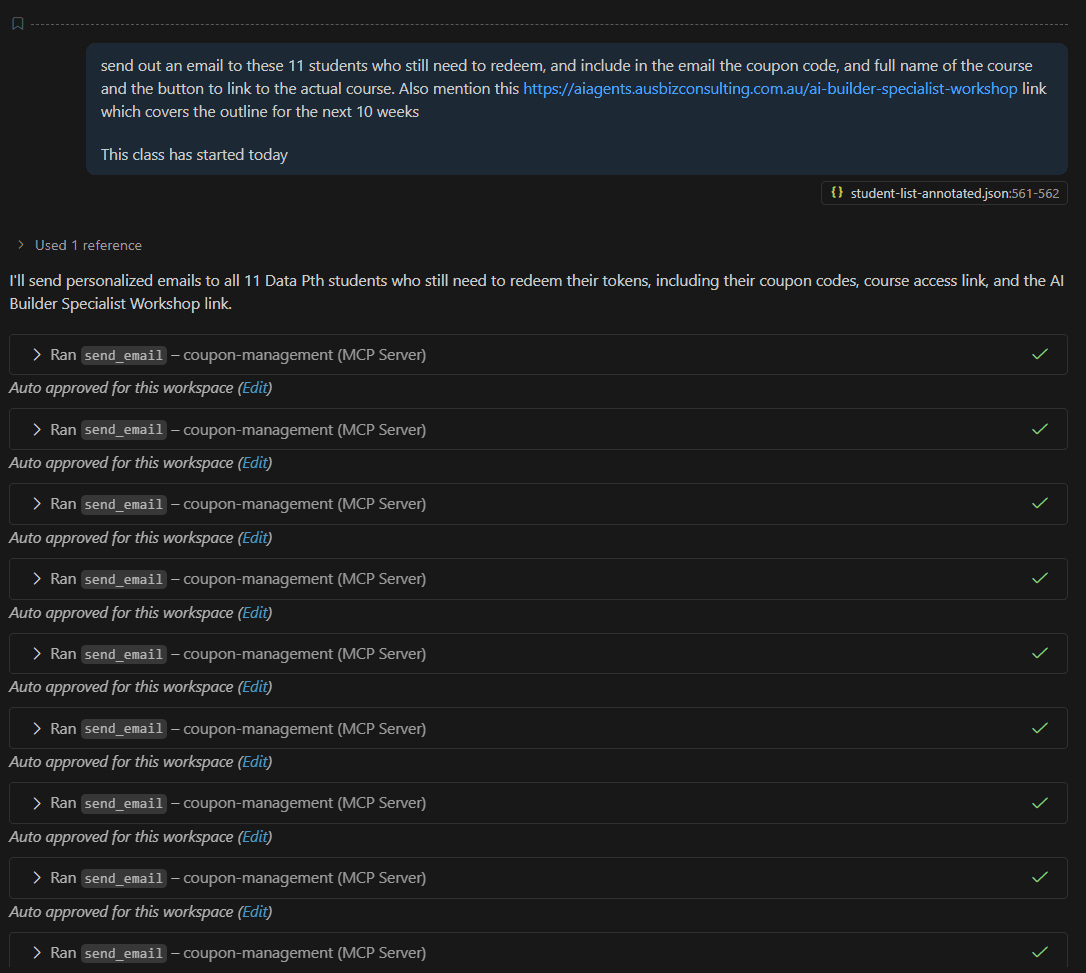
This chapter explains what Agent Mode means, how it works in familiar tools like Microsoft Excel, and how it’s being adopted across modern business software, including accounting and ERP systems.
What Does “Agent Mode” Mean?
In simple terms, Agent Mode means that AI has the ability not only to understand your request but also to take direct actions inside an application or workflow — safely and intelligently.
Traditional AI systems (like ChatGPT in its early days) could only give advice:
“Here’s the formula you can use in Excel.”
But in Agent Mode, the AI can take that formula and insert it directly into your spreadsheet — exactly where it belongs.
So rather than giving you instructions to follow, it becomes a digital assistant that does the work for you.
This transition from instruction to execution is one of the most important breakthroughs in AI since the rise of Large Language Models.
How Agent Mode Differs from Traditional AI Tools
Let’s compare the two modes clearly:
Traditional Chat Mode:
You ask a question.
The AI gives you an answer or suggestion.
You decide what to do with that answer.
Agent Mode:
You give the AI a goal (e.g., “Summarise this report” or “Format this spreadsheet”).
The AI plans and performs the actions directly within the software.
You can review, approve, or undo the changes.
It’s the difference between a consultant giving you advice and an assistant completing the task under your supervision.
Example: Microsoft Excel in Agent Mode
Microsoft has been one of the pioneers in introducing Agent Mode into productivity software.
With Microsoft 365 Copilot, Excel now allows users to type commands in natural language like:
“Highlight all expenses above $10,000.”
“Create a chart comparing monthly sales by region.”
“Add a new column to calculate the gross profit margin.”
Instead of just describing what formula or steps to take, the AI performs those actions directly in Excel — inserting columns, writing formulas, and generating charts in seconds.
Behind the scenes, the AI agent interprets your request, identifies which actions to take, and executes them safely, with the option for you to review or modify the results.
This turns Excel from a static spreadsheet tool into a collaborative workspace where AI helps you manage, clean, and analyse data in real time.
Agent Mode in Word, Outlook, and PowerPoint
Microsoft’s Copilot extends this capability beyond Excel:
In Word, it can summarise long reports, rewrite sections for clarity, or format a document professionally.
In Outlook, it drafts and schedules emails, summarises conversation threads, and even proposes replies.
In PowerPoint, it can take a written prompt such as “Create a 5-slide presentation summarising last quarter’s revenue” and instantly build a full slide deck.
In each of these cases, the AI is embedded inside the application and can take real actions rather than just giving text advice.
This is the essence of Agent Mode: the AI doesn’t just think — it acts.
Agent Mode in Accounting and ERP Applications
Agent Mode is especially powerful in accounting and enterprise software, where users often perform repetitive data-driven tasks.
Here are a few real-world examples:
SAP Joule (SAP’s AI Assistant)
SAP’s embedded assistant, Joule, operates in a form of Agent Mode. You can ask:
“Generate a summary of last month’s financial close process and highlight accounts pending approval.”
Joule can retrieve the relevant records, perform the necessary calculations, and generate a report — all inside SAP, without you needing to export data.
It doesn’t just read; it acts. It can trigger workflows, create entries, or send notifications to users for approvals.
QuickBooks and Xero
Modern SaaS accounting platforms like QuickBooks and Xero have started implementing AI features that operate similarly to agents:
You might say:
“Reconcile all transactions from yesterday’s bank feed,”
and the AI performs that action, flagging only the exceptions for manual review.
Or
“Generate a profit and loss summary for this financial quarter.”
The AI instantly fetches the data, applies filters, and presents the results visually — ready for download or inclusion in management reports.
Expense and Payroll Systems
In tools like Workday, SAP SuccessFactors, or Zoho People, AI agents can automate employee reimbursements, verify compliance with expense policies, or even update HR records automatically.
These are not static automations; they’re intelligent agents that understand context, reason through rules, and take actions dynamically.
Everyday Examples of Agent Mode Around You
Even outside enterprise software, Agent Mode is appearing everywhere:
Gmail: AI can now automatically sort or prioritise emails, or schedule meetings based on content.
Google Sheets: AI can clean data, insert functions, and even connect with other systems like Google Finance.
Notion and ClickUp: AI can summarise project updates and then take action — for example, updating task statuses or creating new to-do items automatically.
CRM Tools (like Salesforce or HubSpot): AI agents can automatically send follow-up emails to clients or adjust sales forecasts based on recent data.
These systems no longer rely on the user to copy-paste results — they directly perform tasks within their own environment, safely and efficiently.
How AI Agents Know What to Do
A natural question arises: How does the AI know what it can or cannot do?
In Agent Mode, the system is connected to a specific set of tools or “capabilities” that define what actions it’s allowed to perform.
For example, in Excel, the AI can:
Insert columns or rows
Apply formulas
Create charts
Sort or filter data
But it cannot delete entire files or access data outside the workbook unless permitted.
This is achieved through controlled permissions and guardrails, ensuring the AI only acts within safe boundaries defined by the software provider.
Think of it as a digital assistant with a limited job description — it can perform the tasks you’d normally do yourself but cannot access areas it’s not supposed to.
Benefits of Agent Mode
1. Productivity Boost
Tasks that once took minutes or hours — such as data preparation or formatting — can now be completed in seconds.
2. Reduced Errors
Since the AI follows exact instructions and applies consistent logic, the risk of manual errors decreases.
3. Natural Interaction
You don’t need to remember formulas or navigation paths. You just describe your goal in plain English.
4. Continuous Learning
As the AI observes how users interact, it improves its understanding of context, helping it act more intelligently over time.
5. Empowerment
Even non-technical users can now perform complex actions that previously required expertise — levelling the playing field in the workplace.
Challenges and Safeguards
Despite its power, Agent Mode also introduces new challenges:
Permission Control: The AI must be carefully limited so it doesn’t perform unintended actions, such as modifying sensitive records.
Accountability: Organisations must ensure there’s an audit trail of what the AI did, when, and why.
User Trust: Professionals need confidence that the AI will execute safely and accurately.
Training and Adaptation: Users need to learn how to give effective instructions and understand what the AI can do.
Leading enterprise systems like SAP, Microsoft, and Salesforce have invested heavily in building these safeguards — ensuring every AI action is traceable, reversible, and compliant with business policies.
The Future – Agentic Workflows Everywhere
Agent Mode represents the next frontier of workplace automation.
In the near future, accountants may simply tell their system:
“Prepare the management pack for this quarter, reconcile all bank transactions, and notify me if any entries are missing supporting documents.”
The AI agent will execute those instructions step by step — accessing data, performing validations, and generating outputs — while you oversee the process.
Similarly, business analysts might say:
“Compare this month’s revenue with last year’s and draft a commentary explaining major variances.”
The agent would run the analysis, prepare the charts, and even suggest narrative explanations for approval.
This is not distant speculation — these capabilities already exist in early form within tools like Microsoft Copilot, SAP Joule, and ChatGPT with advanced actions.
Conclusion – The Shift from Assistant to Colleague
Agent Mode represents a fundamental shift in how we interact with technology. Instead of treating software as a passive tool, we are now working alongside intelligent digital colleagues that can both understand and act.
In Excel, that means analysing and updating data for you.
In SAP, it means preparing reports and triggering workflows.
In email or CRM systems, it means managing communication automatically.
As Agent Mode becomes standard, AI will move beyond answering questions — it will start getting things done.
And just as the calculator once transformed the accountant’s desk, Agent Mode will transform the accountant’s workflow — quietly, intelligently, and profoundly.